
Introduction
LabelForge .Introducing the Label Maker That Turns One Simple List Into a Matching, Print-Ready Label Set on Common Sticker Sheets Every label sized the same way, checked before export, with a printer alignment page and PDF + PNG files you can print or sell.Looking for an easier way to create matching labels for your Etsy shop, handmade products, or home organization? LabelForge is a browser-based label maker designed to turn a simple list of names into complete, print-ready label sets.
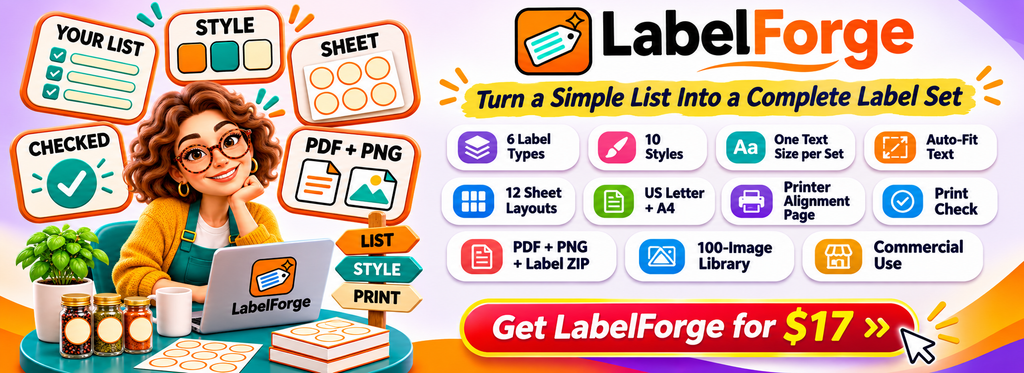
Instead of designing each label separately, you can enter your list, select a style, choose a sticker-sheet layout, and generate an entire matching collection. Moreover, LabelForge includes automatic text fitting, printer alignment tools, and print-quality checks.
But is LabelForge worth buying? Can beginners use it? And is it suitable for selling printable labels online?
In this detailed LabelForge review, we’ll explore its features, benefits, pricing, commercial-use rights, limitations, bonuses, and refund policy. We’ll also explain who should consider buying it.
LabelForge 2026 Get Access Here

What Is LabelForge?
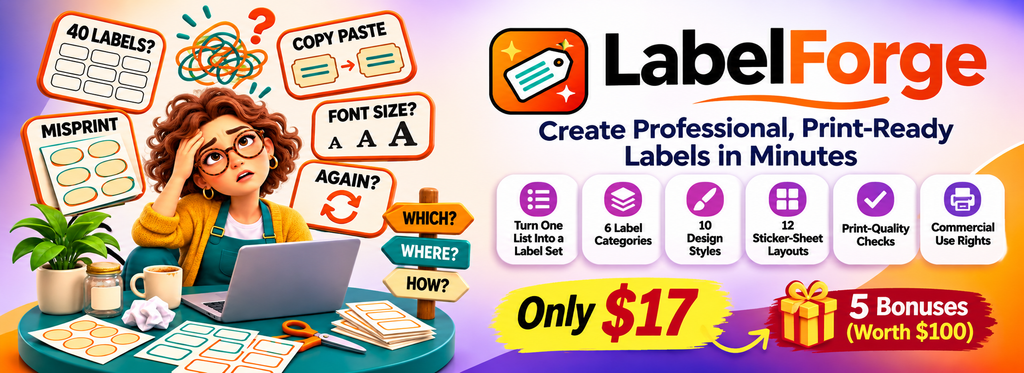
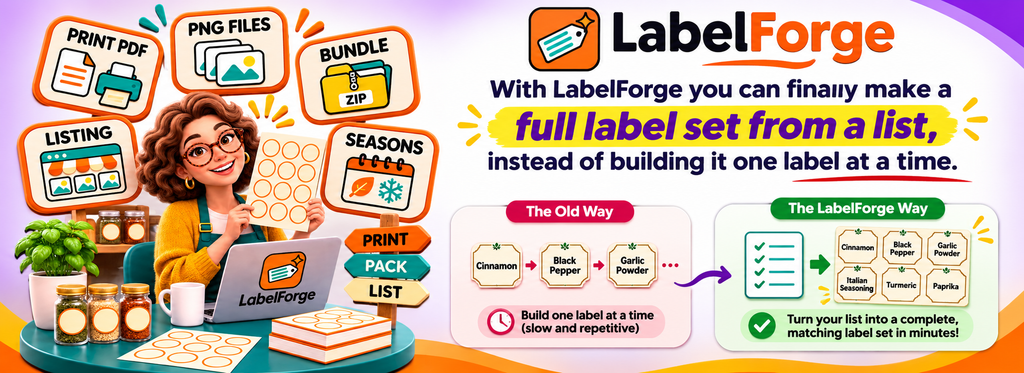
LabelForge is an online label-making application developed by Groovydigi. It helps users create matching printable labels without manually designing and positioning every individual label.For example, imagine you want to create 40 different spice jar labels. Traditionally, you might design one label, duplicate it, change the text, and adjust the spacing repeatedly.
However, LabelForge simplifies that process.
You can enter all 40 spice names, select a design style, and let the software arrange them across compatible sticker sheets. As a result, you can spend less time on repetitive formatting.
Additionally, LabelForge supports labels for candles, soap products, children’s belongings, pantry containers, and gift tags.Unlike AI-powered design tools, LabelForge does not generate designs using artificial intelligence. Instead, it uses predefined styles, measured layouts, and automatic formatting.
Therefore, its main purpose is not unlimited creative design. Its strength is producing consistent, printable label collections efficiently.
LabelForge Quick Product Overview
| Product details | Information |
|---|---|
| Product name | LabelForge |
| Developer | Groovydigi |
| Marketplace | WarriorPlus |
| Product type | Browser-based printable label maker |
| Price | $17 one-time |
| Subscription | No monthly fee advertised |
| Label categories | 6 |
| Built-in styles | 10 |
| Sticker-sheet layouts | 12 |
| Supported paper | US Letter and A4 |
| Image library | 100 images |
| Export formats | PDF, PNG, ZIP |
| Commercial use | Included for created labels |
| Bonuses | 5 |
| Refund policy | 30-day money-back guarantee |
| Best for | Etsy sellers, printable creators, small businesses, home organizers |
Key Features of LabelForge
1. Turn One List Into a Complete Label Set
One of LabelForge’s most useful features is its list-to-label workflow.Rather than creating labels individually, you can type or paste multiple names into the editor.
For example:
- Cinnamon
- Black Pepper
- Garlic Powder
- Italian Seasoning
- Turmeric
- Paprika
After entering your list, the application arranges the names into a matching label collection.You can also add an optional second line, such as a botanical name, scent description, or additional product information.
Why it matters: This feature can reduce repetitive work when preparing large printable bundles.
2. Six Different Label Categories
LabelForge provides six built-in label types.
| Label type | Common uses |
|---|---|
| Pantry and kitchen | Food containers, flour, sugar, rice, pasta |
| Spice jars | Herbs, spices, seasonings |
| Kids’ names | School supplies, lunch boxes, storage bins |
| Candle warning | Candle branding and editable safety text |
| Soap and bath | Handmade soaps, scrubs, bath salts |
| Gift tags | Holiday gifts, party favors, special occasions |
These categories make the software useful for several creative projects.For instance, Etsy sellers can create printable pantry collections. Meanwhile, handmade candle businesses can prepare coordinated product labels.
However, users must still verify any legally required product information.
3. Ten Professional Design Styles
LabelForge includes 10 built-in styles.
These include minimalist, vintage, apothecary, pastel, and other decorative approaches.You can apply a style to an entire label collection rather than adjusting every label separately.
Additionally, the software offers 12 font pairs and accent-color customization.
Consequently, you can create different visual variations from the same list.
For example, a spice collection could have a simple black-and-white design for modern kitchens or a vintage-inspired appearance for farmhouse décor.
4. Automatic Text Fitting
Long product names often create formatting problems.
A short name such as “Salt” may fit easily. However, “Organic Italian Herb Seasoning” needs more space.
LabelForge measures text using the selected font and adjusts it to fit the available label area.Furthermore, its consistent text-size mode can choose one size that works across the collection.
This helps prevent uneven-looking labels and reduces the need for manual resizing.
5. Twelve Sticker-Sheet Layouts
LabelForge supports 12 common sticker-sheet arrangements across US Letter and A4 paper sizes.
Available shapes include round, rectangular, square, and oval labels.
As a result, users can prepare designs for different packaging and organizing needs.For example, round labels may work well for spice jars, while rectangular labels may suit pantry containers.
However, before buying sticker paper, confirm that its measurements and spacing match a supported layout.
6. Built-In Printer Alignment Tool
Printing labels can be frustrating when designs do not line up with sticker sheets.
Fortunately, LabelForge includes a printer alignment page.
You can print the test page on regular paper, compare it with your sticker sheet, and adjust the alignment.
The software supports offset adjustments in increments of 1/32 inch and remembers the setting for the paper size on your device.
Therefore, this feature may help reduce wasted sticker paper.
7. Automatic Print-Quality Checks
LabelForge checks designs for potential printing problems before export.
According to the developer, its checks cover:
- Text extending outside its available space
- Text smaller than 6 points
- Content positioned too close to cutting edges
- Low-resolution images
- Low-contrast text
- Empty or duplicate label entries
When a problem appears, users can locate the affected label and make corrections.This is particularly useful for printable sellers who want to avoid sending customers poorly formatted files.
8. Multiple Export Formats
LabelForge provides three important export options.
Print-ready PDF: Creates a document at the selected sheet size, with embedded fonts.
Sheet PNG: Exports each completed sheet as a 300 DPI image.
Individual-label ZIP: Provides a collection of separate label PNG files.
These options offer flexibility for printing, organizing digital products, and preparing customer downloads.
9. Built-In 100-Image Library
The application includes 100 images, covering decorative artwork, icons, seasonal motifs, and other label-friendly graphics.
According to the developer, the collection contains public-domain artwork, CC0 images, and original designs.
Moreover, each library image includes source and license information.
Users can also upload their own images and logos.
For example, a candle maker could add a business logo, while a printable seller could use botanical artwork to create a coordinated spice-label collection.
10. Commercial-Use Rights
Commercial-use permission is an important feature for digital product sellers.
LabelForge allows users to sell or give away the labels they create, including designs incorporating the supplied image library.
For example, you could create printable label bundles for an Etsy store or sell downloads through Shopify, Payhip, or Gumroad.
However, commercial use of your finished labels is different from permission to resell the software or its image library.
Also, the vendor states that creating labels for clients requires its separate Agency upgrade.Therefore, check the applicable license before offering custom label-design services.
LabelForge 2026 Get Access Here
How Does LabelForge Work? Step-by-Step Guide
Getting started with LabelForge appears straightforward, even for beginners.
Step 1: Choose Your Label Type and Sheet
Select a label category, such as pantry, spice jar, or gift tags. Next, choose a supported US Letter or A4 sticker-sheet layout.
Step 2: Enter Your List and Select a Style
Paste your label names, one per line. Then choose a design style, adjust the colors, and add your own images or logo if needed.
Step 3: Check, Align, and Export
Review the print warnings, correct any problems, and use the printer alignment page. Finally, export your labels as PDF or PNG files.
After exporting, you can print the labels for personal use or prepare digital download products for your online store.
Who Should Buy LabelForge?
LabelForge may be suitable for several types of users.
Etsy and printable sellers: People creating matching printable collections can benefit from the list-to-label workflow and commercial-use rights.
Small business owners: Candle makers, soap businesses, and other handmade-product sellers can use it to prepare branded labels for their own products.
Home organization enthusiasts: People who enjoy organizing kitchens, pantries, classrooms, and storage spaces may appreciate its coordinated label styles.
Beginners: Users without advanced graphic design skills may find the predefined styles and automated layout system easier than building every label manually.
However, professional designers who need advanced vector editing, barcode generation, or complete creative control may prefer specialized design software.
LabelForge Pricing: How Much Does It Cost?
Advertised front-end price $17 one-time payment
No monthly subscription or AI credits required.
The package includes the core label editor, commercial-use rights for finished labels, and five bonuses.View LabelForge Official OfferThe $17 front-end package is advertised as a complete, usable product. However, additional upgrades are available for advanced needs.
These optional upgrades include more styles, custom sticker-sheet sizes, ready-made lists, a bundle builder, listing templates, and an Agency license for client work.
The official page does not provide a complete price list for those upgrades. Therefore, buyers should review any additional offers before purchasing.
Important Pricing Considerations
Although LabelForge does not require a monthly subscription, physical printing may involve additional expenses.For example, you may need sticker paper, printer ink, packaging materials, or a suitable printer.
Furthermore, online marketplaces may charge listing or transaction fees.Therefore, consider these costs when planning to sell printable or physical labels.
LabelForge Bonuses: What Do You Get for Free?
According to the official sales page, buyers receive five additional resources.
| Bonus | Advertised value |
|---|---|
| Print & Cut Guide | $20 |
| 100 Label-Bundle Ideas | $20 |
| Bundle Cost & Pricing Worksheet | $20 |
| Listing Photo Prompt Pack | $20 |
| Customer Print Instructions Template | $20 |
| Total advertised bonus value | $100 |
Bonus 1: Print & Cut Guide
This guide explains how to choose sticker paper, adjust printer settings, and cut labels correctly.Additionally, it includes troubleshooting information for common printing problems.
Bonus 2: 100 Label-Bundle Ideas
This resource provides 100 ideas organized by room and season.For example, sellers can explore pantry collections, holiday gift tags, and other printable label products.
Bonus 3: Bundle Cost & Pricing Worksheet
The worksheet helps sellers estimate their costs before setting product prices.It considers materials, time, and fees.
Therefore, it may help beginners avoid overlooking important expenses.
Bonus 4: Listing Photo Prompt Pack
This pack includes ten prompts for creating product-listing scenes using an AI image tool.
However, the AI image tool itself is not included.
Bonus 5: Customer Print Instructions Template
This editable template helps sellers explain printing instructions to customers.Clear instructions can make digital products easier to use and may reduce basic support questions.
Overall, the bonuses complement the main application, especially for people planning to sell printable labels.
LabelForge Refund Policy and Guarantee
LabelForge includes an advertised 30-day money-back guarantee.
According to the developer, buyers can contact the support team within 30 days of purchase if the software does not meet their needs.
The company states that no reason is required for the refund.
However, refunding the front-end purchase also closes the user’s account.For additional information, review the terms on the official website before purchasing.
LabelForge Pros and Cons
Advantage
- Affordable $17 one-time price
- Creates complete matching label sets from lists
- Ten built-in design styles
- Supports US Letter and A4 sticker sheets
- Automatic text fitting and print checks
- PDF and PNG export options
- Commercial-use rights for finished labels
- Five useful bonuses included
- No AI subscription or API key required
Limitation
- Only 12 standard sheet layouts in the base version
- No SVG or DXF cutting-machine exports
- No barcode generator
- Not designed for smartphone editing
- Client work requires the Agency upgrade
- Does not automatically publish marketplace listings
- PDF exports include a small LabelForge credit outside the labels
- No automatic verification of product-label regulations
Can You Make Money With LabelForge?
LabelForge allows users to create commercial printable products. However, it does not guarantee sales or income.For example, sellers could create seasonal gift-tag collections, spice-label bundles, or printable organization sets.
They could then list those files on Etsy or their own digital storefront.
Nevertheless, making a printable product is only one part of running a successful business.Sellers must also consider customer demand, product quality, listing presentation, marketplace competition, and pricing.
The developer references existing Etsy demand for several label categories. However, that information does not establish how much a new seller can earn.Therefore, LabelForge is best viewed as a production tool, not an automatic income system.
LabelForge 2026 Get Access Here
Frequently Asked Questions About LabelForge
Is LabelForge beginner-friendly?
Yes, its workflow is designed for beginners. Users can enter a list, select a style, preview the result, and export the completed labels without advanced design experience.
Does LabelForge require a monthly subscription?
No. The advertised front-end price is $17 as a one-time payment, with no monthly subscription or AI credits.
Can I use LabelForge for Etsy products?
Yes. The commercial-use license permits selling the finished labels you create. However, you must create and manage your marketplace listings separately.
Can I upload my own logo?
Yes. LabelForge supports custom logos and artwork. It also offers browser-based background removal for suitable images.
Does LabelForge work offline?
According to the developer, the application can continue working offline after signing in.
Can I use LabelForge on my phone?
The editor is intended for computers and tablets, rather than smartphones.
Does LabelForge support cutting machines?
It does not export SVG or DXF cutting files. Instead, it focuses on printable PDF and PNG formats.
Can I make unlimited label projects?
The developer advertises unlimited projects in the front-end application.
Is LabelForge an AI tool?
No. LabelForge uses predefined design styles and automatic layout calculations rather than generative AI.
Does LabelForge offer a refund?
Yes. The advertised refund period is 30 days from purchase.
Final Verdict: Is LabelForge Worth Buying in 2026?
LabelForge offers a practical solution for people who regularly create printable label collections.
Its strongest advantage is the ability to turn a simple list into a coordinated set without designing each label individually. Additionally, its automatic text fitting, print checks, and alignment tools address common problems associated with printing labels.For Etsy sellers, small product businesses, and home organizers, the $17 one-time price may offer reasonable value.
However, LabelForge is not a complete graphic design platform. It does not generate AI artwork, provide barcode tools, or automatically sell products.LabelForge is worth considering if your main goal is to create matching, print-ready label sets quickly and consistently. Before purchasing, confirm that its available sheet sizes, export formats, and licensing terms meet your requirements.
Leave a Reply